


jquery动感漂浮导航菜单代码分享 - Web前端
作者:98wpeu发布时间:2026-08-20分类:网页前端技术浏览:120
导读:这是一款基于JQuery实现动感漂浮导航菜单的特效代码,菜单可以上下浮动,动感十足,为自己的网站增加了活力,是一款非常实用的导航菜单特效源码。运行效果图:点击下载源码为大...
这是一款基于JQuery实现动感漂浮导航菜单的特效代码,菜单可以上下浮动,动感十足,为自己的网站增加了活力,是一款非常实用的导航菜单特效源码。
运行效果图:
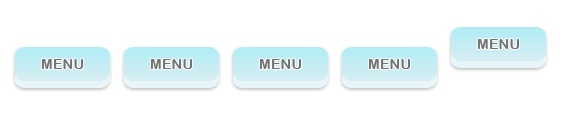
点击下载源码
为大家分享的jQuery动感漂浮导航菜单代码如下
<head>
 <meta http-eqUIv="Content-type" content="text/html; charset=utf-8">
 <title>jquery Floating menu</title>
 <script type="text/javascript" src="JS/jquery-1.3.1.min.js"></script>
 <script type="text/JavaScript" src="js/JQuery.Easing.1.3.js"></script>
 <script>

 $(document).ready(function () {

 //get the default top value
 var top_val = $('#menu li a').CSS('top');

 //Animate the selected menu item
 $('#menu li.selected').children('a').stop().animate({top:0}, {easing: 'eaSEOutQuad', duration:500});

 $('#menu li').hover(
 function () {

 //animate the menu item with 0 top value
 $(this).children('a').stop().animate({top:0}, {easing: 'easeoutQuad', duration:500});
 },
 function () {

 //set the position to default
 $(this).children('a').stop().animate({top:top_val}, {easing: 'easeOutQuad', duration:500});

 //always keep the PReviously selected item in fixed position
 $('#menu li.selected').children('a').stop().animate({top:0}, {easing: 'easeOutQuad', duration:500});
 }
 );

 });

 </script>

 <style>


 #menu {
 list-style:none;
 padding:0;
 margin:0 auto;;
 height:70px;
 width:600px;
 }

 #menu li {
 float:left;
 width:109px;
 height:inherit;
 position:relative;
 overflow:hidden;
 }

 #menu li a {
 position:absolute;
 top:20px;
 text-indent:-999em;
 background:url(menu.png) no-repeat 0 0;
 display:block;
 width:109px;
 height:inherit;

 /* fast png fix for IE6 */
 position:relative;
 behavior: Expression((this.runtimeStyle.behavior="none")&&(this.pngSet?this.pngSet=true:(this.nodeName == "IMG" && this.src.toLowerCase().indexof('.png')>-1?(this.runtimeStyle.backgroundImage = "none",
this.runtimeStyle.filter = "progid:DXImagetransform.microsoft.AlphAImageloader(src='" + this.src + "', sizingMethod='image')",
this.src = "transparent.gif"):(this.origBg = this.origBg? this.origBg :this.currentStyle.backgroundImage.toString().Replace('url("','').replace('")',''),
this.runtimeStyle.filter = "progid:DXImageTransFORM.Microsoft.AlphaImageLoader(src='" + this.origBg + "', sizingMethod='crop')",
this.runtimeStyle.backgroundImage = "none")),this.pngSet=true));
 }

 </style>

</head>
<body>
<br/><br/><br/>

<ul id="menu">
 <li><a href="#">Item 1</a></li>
 <li><a href="#">Item 2</a></li>
 <li><a href="#">Item 3</a></li>
 <li><a href="#">Item 4</a></li>
 <li><a href="#">Item 5</a></li>
</ul>
<head>
 <meta HTTP-equiv="Content-Type" content="text/HTML; charset=utf-8">
 <title>jQuery Floating Menu</title>
 <script type="text/Javascript" src="js/jquery-1.3.1.min.js"></script>
 <script type="text/javascript" src="js/jquery.easing.1.3.js"></script>
 <script>

 $(document).ready(function () {

 //get the default top value
 var top_val = $('#menu li a').css('top');

 //animate the selected menu item
 $('#menu li.selected').children('a').stop().animate({top:0}, {easing: 'easeOutQuad', duration:500});

 $('#menu li').hover(
 function () {

 //animate the menu item with 0 top value
 $(this).children('a').stop().animate({top:0}, {easing: 'easeOutQuad', duration:500});
 },
 function () {

 //set the position to default
 $(this).children('a').stop().animate({top:top_val}, {easing: 'easeOutQuad', duration:500});

 //always keep the previously selected item in fixed position
 $('#menu li.selected').children('a').stop().animate({top:0}, {easing: 'easeOutQuad', duration:500});
 }
 );

 });

 </script>

 <style>


 #menu {
 list-style:none;
 padding:0;
 margin:0 auto;;
 height:70px;
 width:600px;
 }

 #menu li {
 float:left;
 width:109px;
 height:inherit;
 position:relative;
 overflow:hidden;
 }

 #menu li a {
 position:absolute;
 top:20px;
 text-indent:-999em;
 background:url(menu.png) no-repeat 0 0;
 display:block;
 width:109px;
 height:inherit;

 /* fast png fix for ie6 */
 position:relative;
 behavior: expression((this.runtimeStyle.behavior="none")&&(this.pngSet?this.pngSet=true:(this.nodeName == "IMG" && this.src.toLowerCase().indexOf('.png')>-1?(this.runtimeStyle.backgroundImage = "none",
this.runtimeStyle.filter = "progid:DXImageTransform.Microsoft.AlphaImageLoader(src='" + this.src + "', sizingMethod='image')",
this.src = "transparent.gif"):(this.origBg = this.origBg? this.origBg :this.currentStyle.backgroundImage.tostring().replace('url("','').replace('")',''),
this.runtimeStyle.filter = "progid:DXImageTransForm.Microsoft.AlphaImageLoader(src='" + this.origBg + "', sizingMethod='crop')",
this.runtimeStyle.backgroundImage = "none")),this.pngSet=true));
 }

 </style>

</head>
<body>
<br/><br/><br/>

<ul id="menu">
 <li><a href="#">Item 1</a></li>
 <li><a href="#">Item 2</a></li>
 <li><a href="#">Item 3</a></li>
 <li><a href="#">Item 4</a></li>
 <li><a href="#">Item 5</a></li>
</ul>
以上就是为大家分享的jquery动感漂浮导航菜单代码,希望大家可以喜欢。
相关推荐
- jQuery EasyUI API 中文文档 - ProgressBar 进度条 - Web前端
- jQuery最佳实践完整篇 - Web前端
- 让你的CSS像Jquery一样做筛选的实现方法 - Web前端
- 基于jquery的浮动层效果代码 - Web前端
- 基于JQuery实现CheckBox全选全不选 - Web前端
- jQuery实战之仿淘宝商城左侧导航效果 - Web前端
- jQuery-Tools-overlay 使用介绍 - Web前端
- 基于jquery的从一个页面跳转到另一个页面的指定位置的实现代码(带平滑移动的效果) - Web前端
- Jquery使用Firefox FireBug插件调试Ajax步骤讲解 - Web前端
- jQuery实用函数用法总结 - Web前端
- 网页前端技术排行
-
- 1[Web前端]用javascript实现默认图片替代未显示的图片 - Web前端
- 2分析Iconfont-阿里巴巴矢量常用图标库 - Web前端
- 3jQuery实例教程:制作网页中可折叠的面板 - Web前端
- 4【第六章】Foundation之按钮和下拉功能 - Web前端
- 5基于jquery的滚动条滚动固定div(附演示下载) - Web前端
- 6jQuery编写widget的一些技巧分享 - Web前端
- 7在Mac/PC上远程调试iPhone/iPad上的网页 - Web前端
- 8分享精心挑选的12款优秀jQuery Ajax分页插件和教程 - Web前端
- 9jQuery实现鼠标移到元素上动态提示消息框效果 - Web前端
- 最近发表
-
- WordPress随机显示特色图片插件:Random Post Thumbnails
- KeePass实现Chrome浏览器自动填充密码方法一
- LNMP一键包nginx 301强制跳转到https教程
- KeePass实现Chrome浏览器自动填充密码方法二
- #建站# 免费的VPS管理软件Xshell8/Xftp8中文版下载
- 使用Xshell 8连接VPS教程_电脑登录vps的方法
- WordPress评论界面添加烟花????效果
- 不同浏览器书签同步方案:坚果云+Floccus_详细使用教程
- iOS端KeePassXC客户端APP:Strongbox Password Safe
- 给WordPress评论中的Gravatar头像图片添加ALT属性