


用jquery写的菜单从左往右滑动出现 - Web前端
作者:98wpeu发布时间:2026-10-13分类:网页前端技术浏览:4
导读:最近,刚好在研究微网站的制作,查阅了大量的资料都是关于微信3平台开发教程,几乎没有这类的介绍,不过都是第三方平台提供模板制作微站而已,后来很感谢柳峰博客最后写的微网站的解惑,“什...
最近,刚好在研究微网站的制作,查阅了大量的资料都是关于微信3平台开发教程,几乎没有这类的介绍,不过都是第三方平台提供模板制作微站而已,后来很感谢柳峰博客最后写的微网站的解惑,
“什么是微网站?
微网站是新瓶装老酒,被一些搞营销的人给神化了,以至于很多开发者都在问什么是微网站,如何开发微网站。微网站本质上就是以微信浏览器为入口的手机网站(Web App),能够兼容Android、iOS、WP等操作系统。开发微网站用到的技术与开发普通网站一样,都是基于html(html5)、CSS、javascript等,所以有普通网站开发经验的开发者,完全有能力开发微网站。
PS:初学者以后再看到什么以“微”开头的新名词,例如:微商城、微客服、微统计,直接把“微”字去掉或者把“微”当作是“基于微信的”就不难理解了。”,
大部分都涉及HTML5的写法,这样就好理解了。。。还有就是参考了“微信生意宝”中的案例,里面的导航自己写了下demo,感觉还是很好理解的,下面上界面效果图
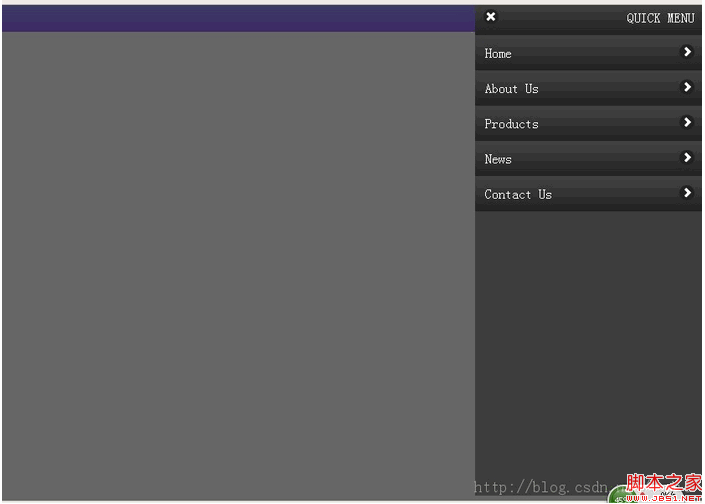
因为是用jq所写,需要引用库文件,这边使用的是在线的CDN地址:
复制代码 代码如下:
<script src="http://Ajax.googleAPIs.com/ajax/libs/JQuery/1.8.0/jQuery.min.JS"></script>
然后编写HTML导航结构
复制代码 代码如下:
<div class="qUIck"></div>
<div class="slideLeftmenu">
<div class="quick-toolbar">
<p class="toolbar-title">QUICK MENU</p>
<span class="toolbar-icon-delete"></span>
</div>
<div class="menulist">
<a class="list-item">
<p class="list-item-title">Home</p>
<span class="list-item-icon"></span>
</a>
<a class="list-item">
<p class="list-item-title">About Us</p>
<span class="list-item-icon"></span>
</a>
<a class="list-item">
<p class="list-item-title">PRoducts</p>
<span class="list-item-icon"></span>
</a>
<a class="list-item">
<p class="list-item-title">News</p>
<span class="list-item-icon"></span>
</a>
<a class="list-item">
<p class="list-item-title">contact Us</p>
<span class="list-item-icon"></span>
</a>
</div>
</div>
<div class="masklayer"></div>
这部分没有什么技术性,纯粹就是div结构
复制代码 代码如下:
<span style="white-space:pre"> </span>*{ margin:0; padding:0;}
body{
font-size:1em;
height:100%;
margin:0;
padding:0;
}
复制代码 代码如下:
/*这边是快捷按钮的样式,使用了css3属性写法,没考虑ie8-*/
.quick{
position:relative;
left:0;
top:0;
width:100%;
height:32px;
background:-WEBkit-gradient(linear, left top, left bottom, from(#99f), to(#96f));
background:-webkit-linear-gradIEnt(#99f, #96f);
background: -moz-linear-gradient(#99f, #96f);
background: -ms-linear-gradient(#99f, #9f);
background: -o-linear-gradient(#99f, #96f);
background: linear-gradient(#99f, #96f);
}/*这边就是导航的css了,*/
<span style="white-space:pre"> </span>.slideLeftMenu{
display:none;
width:272px;
min-height:100%;
background:#3D3d3d;
position:absolute;
right:0;
top:0;
z-index:3;
}
.slideLeftMenu .quick-toolbar,
.slideLeftMenu .list-item{
display:block;
width:100%;
float:left;
height:42px;
line-height:42px;
background:-webkit-gradient(linear, left top, left bottom, from(#444), to(#222));
background:-webkit-linear-gradient(#444, #222);
background: -moz-linear-gradient(#444, #222);
background: -ms-linear-gradient(#444, #222);
background: -o-linear-gradient(#444, #222);
background: linear-gradient(#444, #222);
}
.quick-toolbar .toolbar-title{
float:right;
color:#fff;
margin-right:10px;
}
.quick-toolbar .toolbar-icon-delete{
float:left;
width:18px;
height:18px;
margin:11px 0 0 10px;
background:url(images/icons-18-white.png) -73px -1px #212121;
border-radius:9px;
}
.menuList .list-item-title{
float:left;
font:blod 1.125em Arial, Helvetica, sans-serif;
color:#fff;
text-indent:0.75em;
text-align:left;
border:solid 0px red;
}
.menuList .list-item-icon{
float:right;
width:18px;
height:18px;
margin:11px 10px 0 0;
background:url(images/icons-18-white.png) -108px -1px #212121;
border-radius:9px;
}/*遮罩的css部分,这些绝大部分都是使用绝对定位实现的,因为我们要让导航从右侧平滑的飞入*/
.masklayer{
display:none;
width:100%;
height:100%;
position:absolute;
left:0;
top:0;
background:#000;
opacity:0.6;
z-index:2;
}
把css都写好了,也就完成一大半了,剩下就是使用JQ处理动画部分,如下代码
复制代码 代码如下:
window.QuickPanel = { //定义全局函数
'isOpened': false,
'opened': function(){ //定义面板打开的方法,打开的同时如果点击了背景层和快捷按钮层,执行关闭面板
$masklayer.fadeIn().on("click" ,function(){
window.QuickPanel.closed();
});
$quickpanel_toolbar.on("click" ,function(){
window.QuickPanel.closed();
});
$panel.css({ //从右边飞入,使用绝对定位来操作
"width":"272px",
"top":"-6px",
"right":"-272px"
}).show().Animate({"right":"0"},function(){
window.QuickPanel.isOpened = true;
});
},
'closed': function(){ //定义关闭面板方法
$panel.css({"right":"0"}).show().animate({
"right":"-272px"
},function(){
$masklayer.fadeOut(); //这边才淡出的遮罩,我点击快的时候就会出问题。。。
window.QuickPanel.isOpened = false;
$panel.hide(); //等动画结束了吧菜单隐藏,不至于有滚动条
});
}
};
这部分是最重要的,我封装了个quickpanel的函数,里面有open和closed俩方法,,供我们其他DOM元素点击调用会比较方便,最终实现就是图上的下效果,
ps:这边有个问题,在滑动过程会出现滚动条,这样其实是非常不美观的,请问大牛们有办法解决吗??我把附件放资源那边了,麻烦下载运行看看,如果有什么地方不对劲请留言提出来哦~~非常感谢
“什么是微网站?
微网站是新瓶装老酒,被一些搞营销的人给神化了,以至于很多开发者都在问什么是微网站,如何开发微网站。微网站本质上就是以微信浏览器为入口的手机网站(Web App),能够兼容Android、iOS、WP等操作系统。开发微网站用到的技术与开发普通网站一样,都是基于html(html5)、CSS、javascript等,所以有普通网站开发经验的开发者,完全有能力开发微网站。
PS:初学者以后再看到什么以“微”开头的新名词,例如:微商城、微客服、微统计,直接把“微”字去掉或者把“微”当作是“基于微信的”就不难理解了。”,
大部分都涉及HTML5的写法,这样就好理解了。。。还有就是参考了“微信生意宝”中的案例,里面的导航自己写了下demo,感觉还是很好理解的,下面上界面效果图
因为是用jq所写,需要引用库文件,这边使用的是在线的CDN地址:
复制代码 代码如下:
<script src="http://Ajax.googleAPIs.com/ajax/libs/JQuery/1.8.0/jQuery.min.JS"></script>
然后编写HTML导航结构
复制代码 代码如下:
<div class="qUIck"></div>
<div class="slideLeftmenu">
<div class="quick-toolbar">
<p class="toolbar-title">QUICK MENU</p>
<span class="toolbar-icon-delete"></span>
</div>
<div class="menulist">
<a class="list-item">
<p class="list-item-title">Home</p>
<span class="list-item-icon"></span>
</a>
<a class="list-item">
<p class="list-item-title">About Us</p>
<span class="list-item-icon"></span>
</a>
<a class="list-item">
<p class="list-item-title">PRoducts</p>
<span class="list-item-icon"></span>
</a>
<a class="list-item">
<p class="list-item-title">News</p>
<span class="list-item-icon"></span>
</a>
<a class="list-item">
<p class="list-item-title">contact Us</p>
<span class="list-item-icon"></span>
</a>
</div>
</div>
<div class="masklayer"></div>
这部分没有什么技术性,纯粹就是div结构
复制代码 代码如下:
<span style="white-space:pre"> </span>*{ margin:0; padding:0;}
body{
font-size:1em;
height:100%;
margin:0;
padding:0;
}
复制代码 代码如下:
/*这边是快捷按钮的样式,使用了css3属性写法,没考虑ie8-*/
.quick{
position:relative;
left:0;
top:0;
width:100%;
height:32px;
background:-WEBkit-gradient(linear, left top, left bottom, from(#99f), to(#96f));
background:-webkit-linear-gradIEnt(#99f, #96f);
background: -moz-linear-gradient(#99f, #96f);
background: -ms-linear-gradient(#99f, #9f);
background: -o-linear-gradient(#99f, #96f);
background: linear-gradient(#99f, #96f);
}/*这边就是导航的css了,*/
<span style="white-space:pre"> </span>.slideLeftMenu{
display:none;
width:272px;
min-height:100%;
background:#3D3d3d;
position:absolute;
right:0;
top:0;
z-index:3;
}
.slideLeftMenu .quick-toolbar,
.slideLeftMenu .list-item{
display:block;
width:100%;
float:left;
height:42px;
line-height:42px;
background:-webkit-gradient(linear, left top, left bottom, from(#444), to(#222));
background:-webkit-linear-gradient(#444, #222);
background: -moz-linear-gradient(#444, #222);
background: -ms-linear-gradient(#444, #222);
background: -o-linear-gradient(#444, #222);
background: linear-gradient(#444, #222);
}
.quick-toolbar .toolbar-title{
float:right;
color:#fff;
margin-right:10px;
}
.quick-toolbar .toolbar-icon-delete{
float:left;
width:18px;
height:18px;
margin:11px 0 0 10px;
background:url(images/icons-18-white.png) -73px -1px #212121;
border-radius:9px;
}
.menuList .list-item-title{
float:left;
font:blod 1.125em Arial, Helvetica, sans-serif;
color:#fff;
text-indent:0.75em;
text-align:left;
border:solid 0px red;
}
.menuList .list-item-icon{
float:right;
width:18px;
height:18px;
margin:11px 10px 0 0;
background:url(images/icons-18-white.png) -108px -1px #212121;
border-radius:9px;
}/*遮罩的css部分,这些绝大部分都是使用绝对定位实现的,因为我们要让导航从右侧平滑的飞入*/
.masklayer{
display:none;
width:100%;
height:100%;
position:absolute;
left:0;
top:0;
background:#000;
opacity:0.6;
z-index:2;
}
把css都写好了,也就完成一大半了,剩下就是使用JQ处理动画部分,如下代码
复制代码 代码如下:
window.QuickPanel = { //定义全局函数
'isOpened': false,
'opened': function(){ //定义面板打开的方法,打开的同时如果点击了背景层和快捷按钮层,执行关闭面板
$masklayer.fadeIn().on("click" ,function(){
window.QuickPanel.closed();
});
$quickpanel_toolbar.on("click" ,function(){
window.QuickPanel.closed();
});
$panel.css({ //从右边飞入,使用绝对定位来操作
"width":"272px",
"top":"-6px",
"right":"-272px"
}).show().Animate({"right":"0"},function(){
window.QuickPanel.isOpened = true;
});
},
'closed': function(){ //定义关闭面板方法
$panel.css({"right":"0"}).show().animate({
"right":"-272px"
},function(){
$masklayer.fadeOut(); //这边才淡出的遮罩,我点击快的时候就会出问题。。。
window.QuickPanel.isOpened = false;
$panel.hide(); //等动画结束了吧菜单隐藏,不至于有滚动条
});
}
};
这部分是最重要的,我封装了个quickpanel的函数,里面有open和closed俩方法,,供我们其他DOM元素点击调用会比较方便,最终实现就是图上的下效果,
ps:这边有个问题,在滑动过程会出现滚动条,这样其实是非常不美观的,请问大牛们有办法解决吗??我把附件放资源那边了,麻烦下载运行看看,如果有什么地方不对劲请留言提出来哦~~非常感谢
相关推荐
- jQuery写fadeTo示例代码 - Web前端
- jquery实现不同大小浏览器使用不同的css样式表的方法 - Web前端
- 浅析jquery的js图表组件highcharts - Web前端
- JQuery与JS里submit()的区别示例介绍 - Web前端
- Jquery如何实现点击时高亮显示代码 - Web前端
- 节点的插入之append()和appendTo()的用法介绍 - Web前端
- 用jQuery与JSONP轻松解决跨域访问的问题 - Web前端
- JQuery与Ajax调用新浪API获取短网址的代码 - Web前端
- Jquery获取元素的父容器对象示例代码 - Web前端
- jquery.post用法关于type设置问题补充 - Web前端
- 网页前端技术排行
-
- 1[Web前端]用javascript实现默认图片替代未显示的图片 - Web前端
- 2分析Iconfont-阿里巴巴矢量常用图标库 - Web前端
- 3jQuery实例教程:制作网页中可折叠的面板 - Web前端
- 4【第六章】Foundation之按钮和下拉功能 - Web前端
- 5基于jquery的滚动条滚动固定div(附演示下载) - Web前端
- 6jQuery编写widget的一些技巧分享 - Web前端
- 7分享精心挑选的12款优秀jQuery Ajax分页插件和教程 - Web前端
- 8jQuery实现鼠标移到元素上动态提示消息框效果 - Web前端
- 9在Mac/PC上远程调试iPhone/iPad上的网页 - Web前端
- 最近发表
-
- WordPress随机显示特色图片插件:Random Post Thumbnails
- KeePass实现Chrome浏览器自动填充密码方法一
- LNMP一键包nginx 301强制跳转到https教程
- KeePass实现Chrome浏览器自动填充密码方法二
- #建站# 免费的VPS管理软件Xshell8/Xftp8中文版下载
- 使用Xshell 8连接VPS教程_电脑登录vps的方法
- WordPress评论界面添加烟花????效果
- 不同浏览器书签同步方案:坚果云+Floccus_详细使用教程
- iOS端KeePassXC客户端APP:Strongbox Password Safe
- 给WordPress评论中的Gravatar头像图片添加ALT属性