


3Z版基于jquery的图片复选框(asp.net+jquery) - Web前端
作者:98wpeu发布时间:2026-09-28分类:网页前端技术浏览:14
先上效果图: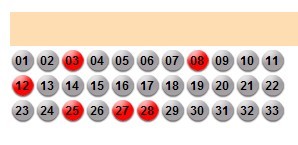
html:
复制代码 代码如下:
<asp:checkboxlist ID="CheckboxList1" runat="server" RepeatDirection="Horizontal" RepeatLayout="Flow" width="280px">
<asp:ListItem>01</asp:ListItem>
<asp:ListItem>02</asp:ListItem>
<asp:ListItem>03</asp:ListItem>
<asp:ListItem>04</asp:ListItem>
<asp:ListItem>05</asp:ListItem>
<asp:ListItem>06</asp:ListItem>
<asp:ListItem>07</asp:ListItem>
<asp:ListItem>08</asp:ListItem>
<asp:ListItem>09</asp:ListItem>
<asp:ListItem>10</asp:ListItem>
<asp:ListItem>11</asp:ListItem>
<asp:ListItem>12</asp:ListItem>
<asp:ListItem>13</asp:ListItem>
<asp:ListItem>14</asp:ListItem>
<asp:ListItem>15</asp:ListItem>
<asp:ListItem>16</asp:ListItem>
<asp:ListItem>17</asp:ListItem>
<asp:ListItem>18</asp:ListItem>
<asp:ListItem>19</asp:ListItem>
<asp:ListItem>20</asp:ListItem>
<asp:ListItem>21</asp:ListItem>
<asp:ListItem>22</asp:ListItem>
<asp:ListItem>23</asp:ListItem>
<asp:ListItem>24</asp:ListItem>
<asp:ListItem>25</asp:ListItem>
<asp:ListItem>26</asp:ListItem>
<asp:ListItem>27</asp:ListItem>
<asp:ListItem>28</asp:ListItem>
<asp:ListItem>29</asp:ListItem>
<asp:ListItem>30</asp:ListItem>
<asp:ListItem>31</asp:ListItem>
<asp:ListItem>32</asp:ListItem>
<asp:ListItem>33</asp:ListItem>
</asp:CheckBoxList>
JS:
复制代码 代码如下:
(function($){
$.fn.imagecheckbox = function(options) {
var defaults = {
checked: "images/radio.gif",
unchecked: "no_images/radio.gif",
CSS: "on",
hide_radiOS_checkboxes: false
};
var opt = $.extend(defaults, options);
this.each(function(){
var obj = $(this);
var type = obj.attr('type');
var id = obj.attr('id');
if(!opt.hide_radIOS_checkboxes){
obj.css('display','none');
}
if(obj.attr('checked')){
$("label[for='" + id + "']").attr('class',opt.css);
}else{
$("label[for='" + id + "']").attr('class','out');
}
$("label[for='" + id + "']").click(function(){
$("#" + id).trigger("click");
if($(this).attr('class') == opt.css){
$(this).attr('class', 'out');
}else {
$(this).attr('class', opt.css);
}
});
});
}
})(JQuery);
使用方式:(把css一起发出来)
复制代码 代码如下:
<script type="text/javascript" src="/scripts/imagetick.js"></script>
<script type="text/JavaScript">
$(function(){
$("input[type='checkbox']").imagecheckbox({ // the selector can be a class as well
checked: "/images/red.gif",
onchecked: "/images/no_check.gif",
css: "on"
});
});
</script>
<style type="text/css">
input{}
label{display:inline-block;width:25px;height:22px;padding-top:3px;text-align:center;font:800 12px/150% arial;position:relative;left;-210px;}
.on{background:url(/images/red.gif) no-repeat;}
.out{background:url(/images/no_check.gif) no-repeat;}
</style>
相关推荐
- JQuery 拾色器插件发布-jquery.icolor.js - Web前端
- 基于jquery1.4.2的仿flash超炫焦点图播放效果 - Web前端
- jquery 新浪网易的评论块制作 - Web前端
- 基于jquery的模态div层弹出效果 - Web前端
- 基于jquery的一个图片hover的插件 - Web前端
- 基于jquery的一个简单的脚本验证插件 - Web前端
- JQuery 插件制作实践 xMarquee插件V1.0 - Web前端
- Jquery+JSon 无刷新分页实现代码 - Web前端
- 24款热门实用的jQuery插件推荐 - Web前端
- 您需要了解和掌握这些jQuery前端的应用 - Web前端
- 网页前端技术排行
-
- 1[Web前端]用javascript实现默认图片替代未显示的图片 - Web前端
- 2分析Iconfont-阿里巴巴矢量常用图标库 - Web前端
- 3jQuery实例教程:制作网页中可折叠的面板 - Web前端
- 4基于jquery的滚动条滚动固定div(附演示下载) - Web前端
- 5【第六章】Foundation之按钮和下拉功能 - Web前端
- 6jQuery编写widget的一些技巧分享 - Web前端
- 7分享精心挑选的12款优秀jQuery Ajax分页插件和教程 - Web前端
- 8jQuery实现鼠标移到元素上动态提示消息框效果 - Web前端
- 9在Mac/PC上远程调试iPhone/iPad上的网页 - Web前端
- 最近发表
-
- WordPress随机显示特色图片插件:Random Post Thumbnails
- KeePass实现Chrome浏览器自动填充密码方法一
- LNMP一键包nginx 301强制跳转到https教程
- KeePass实现Chrome浏览器自动填充密码方法二
- #建站# 免费的VPS管理软件Xshell8/Xftp8中文版下载
- 使用Xshell 8连接VPS教程_电脑登录vps的方法
- WordPress评论界面添加烟花????效果
- 不同浏览器书签同步方案:坚果云+Floccus_详细使用教程
- iOS端KeePassXC客户端APP:Strongbox Password Safe
- 给WordPress评论中的Gravatar头像图片添加ALT属性