


JS Canvas小应用:实现酷炫动态背景,鼠标滑动背景跟着动 - Web前端
作者:98wpeu发布时间:2026-08-30分类:网页前端技术浏览:141
导读:今天想一个JS小应用,用canvas结合Javascript实现酷炫动态背景,鼠标滑动背景跟着动。这种效果在一些专题页面中经常会用到,所以今天在这里分享给大家,参考参考咯。我们先看...

今天想一个JS小应用,用canvas结合Javascript实现酷炫动态背景,鼠标滑动背景跟着动。这种效果在一些专题页面中经常会用到,所以今天在这里分享给大家,参考参考咯。我们先看下效果图:
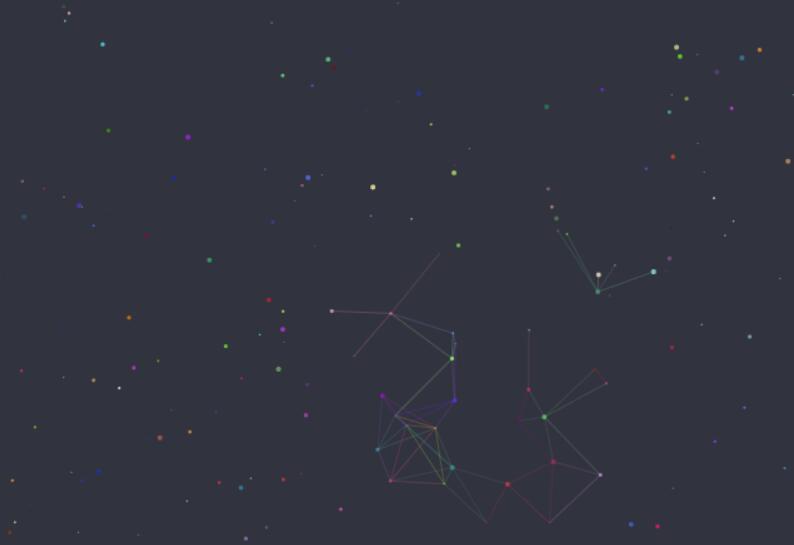
有点像繁星点点的感觉啊,废话不多说,直接上代码吧。核心js代码如何:
window.onload = function () {
    //定义body的margin由默认值8px->0px
    document.body.style.margin = "0";
    document.body.style.background = "#30333F";
    //创建Canvas画布
    document.body.appendChild(document.createElement('canvas'));
    var canvas = document.querySelector('canvas'),
        ctx = canvas.getContext('2d') //ctx返回一个在canvas上画图的API/DOM
    canvas.width = window.innerWidth;
    canvas.height = window.innerHeight;
    canvas.style.position = 'fixed';
    ctx.lineWidth = .3;
    ctx.strokeStyle = (new color(150)).style;
    //定义鼠标覆盖范围
    var mousePosition = {
        x: 30 * canvas.width / 100,
        y: 30 * canvas.height / 100
    };
    var dots = {
        nb: 1000,//Dot的总数
        distance: 50,
        d_radius: 100,
        Array: []
    };
    //创建颜色类,Color类返回字符串型rgba(*,*,*,.8)
    function mixComponents(comp1, weight1, comp2, weight2) {
        return (comp1 * weight1 + comp2 * weight2) / (weight1 + weight2);
    }
    function averageColorStyles(dot1, dot2) {
        var color1 = dot1.color,
            color2 = dot2.color;

        var r = mixComponents(color1.r, dot1.radius, color2.r, dot2.radius),
            g = mixComponents(color1.g, dot1.radius, color2.g, dot2.radius),
            b = mixComponents(color1.b, dot1.radius, color2.b, dot2.radius);
        return createColorStyle(Math.floor(r), Math.floor(g), Math.floor(b));
    }
    function colorvalue(min) {
        return Math.floor(Math.random() * 255 + min);
    }
    function createColorStyle(r, g, b) {
        return 'rgba(' + r + ',' + g + ',' + b + ', 0.8)';
    }
    function Color(min) {
        min = min || 0;
        this.r = colorValue(min);
        this.g = colorValue(min);
        this.b = colorValue(min);
        this.style = createColorStyle(this.r, this.g, this.b);
    }
    //创建Dot类以及一系列方法
    function Dot() {
        this.x = Math.random() * canvas.width;
        this.y = Math.random() * canvas.height;

        this.vx = -.5 + Math.random();
        this.vy = -.5 + Math.random();

        this.radius = Math.random() * 2;

        this.color = new Color();
    }

    Dot.prototype = {
        draw: function () {
            ctx.beginPath();
            ctx.fillStyle = this.color.style;
            ctx.arc(this.x, this.y, this.radius, 0, Math.PI * 2, false);
            ctx.fill();
        }
    };
    function moveDots() {//Dot对象的移动
        for (i = 0; i < dots.nb; i++) {

            var dot = dots.array[i];

            if (dot.y < 0 || dot.y > canvas.height) {
                dot.vx = dot.vx;
                dot.vy = - dot.vy;
            }
            else if (dot.x < 0 || dot.x > canvas.width) {
                dot.vx = - dot.vx;
                dot.vy = dot.vy;
            }
            dot.x += dot.vx;
            dot.y += dot.vy;
        }
    }
    function connectDots() {//DOt对象的连接
        for (i = 0; i < dots.nb; i++) {
            for (j = i; j < dots.nb; j++) {
                i_dot = dots.array[i];
                j_dot = dots.array[j];

                if ((i_dot.x - j_dot.x) < dots.distance && (i_dot.y - j_dot.y) < dots.distance && (i_dot.x - j_dot.x) > - dots.distance && (i_dot.y - j_dot.y) > - dots.distance) {
                    if ((i_dot.x - mousePosition.x) < dots.d_radius && (i_dot.y - mousePosition.y) < dots.d_radius && (i_dot.x - mousePosition.x) > - dots.d_radius && (i_dot.y - mousePosition.y) > - dots.d_radius) {
                        ctx.beginPath();
                        ctx.strokeStyle = averageColorStyles(i_dot, j_dot);
                        ctx.moveTo(i_dot.x, i_dot.y);
                        ctx.lineTo(j_dot.x, j_dot.y);
                        ctx.stroke();//绘制定义的路线
                        ctx.closePath();//创建从当前点回到起始点的路径
                    }
                }
            }
        }
    }
    function createDots() {//创建nb个Dot对象
        for (i = 0; i < dots.nb; i++) {
            dots.array.push(new Dot());
        }
    }
    function drawDots() {//引用Dot原型链,使用draw方法,在canvas上画出Dot对象
        for (i = 0; i < dots.nb; i++) {
            var dot = dots.array[i];
            dot.draw();
        }
    }
    function AnimateDots() {
        ctx.clearRect(0, 0, canvas.width, canvas.height);//清除画布,否则线条会连在一起
        moveDots();
        connectDots();
        drawDots();
        requestAnimationFrame(animateDots);
    }
    createDots();//使用创建Dot类函数
    requestanimationFrame(animateDots);//使用canvas独有的60Hz刷新屏幕画布的方法

    document.queryselector('canvas').addEventListener('mouSEMove', function (e) {
        mousePosition.x = e.pageX;
        mousePosition.y = e.pageY;
    })

    document.querySelector('canvas').addeventlistener('mouseleave', function (e) {//鼠标离开时,连接自动返回到画布中心
        mousePosition.x = canvas.width / 2;
        mousePosition.y = canvas.height / 2;
    })

}
完整的DEMO如下:
<!DOCtype html>
<HTML lang="en">
<head>
    <meta charset="UTF-8">
    <meta http-eqUIv="X-UA-Compatible" content="ie=Edge">
    <meta name="vIEwport" content="width=device-width, initial-scale=1.0">
    <title>JS小应用:酷炫动态背景,鼠标滑动背景跟着动 | Web前端之家www.jiangweishan.com</title>
</head>
<body>
    <script>
        window.onload = function () {
            //定义body的margin由默认值8px->0px
            document.body.style.margin = "0";
            document.body.style.background = "#30333F";
            //创建canvas画布
            document.body.appendChild(document.createElement('canvas'));
            var canvas = document.querySelector('canvas'),
                ctx = canvas.getContext('2d') //ctx返回一个在canvas上画图的api/dom
            canvas.width = window.innerWidth;
            canvas.height = window.innerHeight;
            canvas.style.position = 'fixed';
            ctx.lineWidth = .3;
            ctx.strokeStyle = (new Color(150)).style;
            //定义鼠标覆盖范围
            var mousePosition = {
                x: 30 * canvas.width / 100,
                y: 30 * canvas.height / 100
            };
            var dots = {
                nb: 1000,//Dot的总数
                distance: 50,
                d_radius: 100,
                array: []
            };
            //创建颜色类,Color类返回字符串型rgba(*,*,*,.8)
            function mixComponents(comp1, weight1, comp2, weight2) {
                return (comp1 * weight1 + comp2 * weight2) / (weight1 + weight2);
            }
            function averageColorStyles(dot1, dot2) {
                var color1 = dot1.color,
                    color2 = dot2.color;

                var r = mixComponents(color1.r, dot1.radius, color2.r, dot2.radius),
                    g = mixComponents(color1.g, dot1.radius, color2.g, dot2.radius),
                    b = mixComponents(color1.b, dot1.radius, color2.b, dot2.radius);
                return createColorStyle(Math.floor(r), Math.floor(g), Math.floor(b));
            }
            function colorValue(min) {
                return Math.floor(Math.random() * 255 + min);
            }
            function createColorStyle(r, g, b) {
                return 'rgba(' + r + ',' + g + ',' + b + ', 0.8)';
            }
            function Color(min) {
                min = min || 0;
                this.r = colorValue(min);
                this.g = colorValue(min);
                this.b = colorValue(min);
                this.style = createColorStyle(this.r, this.g, this.b);
            }
            //创建Dot类以及一系列方法
            function Dot() {
                this.x = Math.random() * canvas.width;
                this.y = Math.random() * canvas.height;

                this.vx = -.5 + Math.random();
                this.vy = -.5 + Math.random();

                this.radius = Math.random() * 2;

                this.color = new Color();
            }

            Dot.PRototype = {
                draw: function () {
                    ctx.beginPath();
                    ctx.fillStyle = this.color.style;
                    ctx.arc(this.x, this.y, this.radius, 0, Math.PI * 2, false);
                    ctx.fill();
                }
            };
            function moveDots() {//Dot对象的移动
                for (i = 0; i < dots.nb; i++) {

                    var dot = dots.array[i];

                    if (dot.y < 0 || dot.y > canvas.height) {
                        dot.vx = dot.vx;
                        dot.vy = - dot.vy;
                    }
                    else if (dot.x < 0 || dot.x > canvas.width) {
                        dot.vx = - dot.vx;
                        dot.vy = dot.vy;
                    }
                    dot.x += dot.vx;
                    dot.y += dot.vy;
                }
            }
            function connectDots() {//DOt对象的连接
                for (i = 0; i < dots.nb; i++) {
                    for (j = i; j < dots.nb; j++) {
                        i_dot = dots.array[i];
                        j_dot = dots.array[j];

                        if ((i_dot.x - j_dot.x) < dots.distance && (i_dot.y - j_dot.y) < dots.distance && (i_dot.x - j_dot.x) > - dots.distance && (i_dot.y - j_dot.y) > - dots.distance) {
                            if ((i_dot.x - mousePosition.x) < dots.d_radius && (i_dot.y - mousePosition.y) < dots.d_radius && (i_dot.x - mousePosition.x) > - dots.d_radius && (i_dot.y - mousePosition.y) > - dots.d_radius) {
                                ctx.beginPath();
                                ctx.strokeStyle = averageColorStyles(i_dot, j_dot);
                                ctx.moveTo(i_dot.x, i_dot.y);
                                ctx.lineTo(j_dot.x, j_dot.y);
                                ctx.stroke();//绘制定义的路线
                                ctx.closePath();//创建从当前点回到起始点的路径
                            }
                        }
                    }
                }
            }
            function createDots() {//创建nb个Dot对象
                for (i = 0; i < dots.nb; i++) {
                    dots.array.push(new Dot());
                }
            }
            function drawDots() {//引用Dot原型链,使用draw方法,在canvas上画出Dot对象
                for (i = 0; i < dots.nb; i++) {
                    var dot = dots.array[i];
                    dot.draw();
                }
            }
            function animateDots() {
                ctx.clearRect(0, 0, canvas.width, canvas.height);//清除画布,否则线条会连在一起
                moveDots();
                connectDots();
                drawDots();
                requestAnimationFrame(animateDots);
            }
            createDots();//使用创建Dot类函数
            requestAnimationFrame(animateDots);//使用canvas独有的60Hz刷新屏幕画布的方法

            document.querySelector('canvas').addEventListener('mousemove', function (e) {
                mousePosition.x = e.pageX;
                mousePosition.y = e.pageY;
            })

            document.querySelector('canvas').addEventListener('mouseleave', function (e) {//鼠标离开时,连接自动返回到画布中心
                mousePosition.x = canvas.width / 2;
                mousePosition.y = canvas.height / 2;
            })

        }
    </script>
</body>
</html>相关推荐
- 普通人想开发AI,得先攒哪些基本功? - Web前端
- jQuery 4.0.0 新版带来了什么不一样的体验? - Web前端
- 微信小程序里的ArrayBuffer是啥?咋用?场景有哪些? - Web前端
- 询问 SEO:我是否需要重新考虑我的 LLM 内容策略? - Web前端
- 手画流程图大解密:AI 大模型 + draw.io,终于不用手画流程图了 - Web前端
- JavaScript 2026:JavaScript 将迎重大更新,解决开发者的痛点 - Web前端
- 微信小程序支付手续费是多少?商家和个人有区别吗? - Web前端
- 小程序里的Canvas 2D和Web端有啥不一样? - Web前端
- 小程序appid怎么获取?不同主体、不同平台获取方式有啥区别? - Web前端
- this.setData({id})和this.setData({id:id})有什么区别? - Web前端
- 网页前端技术排行
-
- 1[Web前端]用javascript实现默认图片替代未显示的图片 - Web前端
- 2分析Iconfont-阿里巴巴矢量常用图标库 - Web前端
- 3jQuery实例教程:制作网页中可折叠的面板 - Web前端
- 4【第六章】Foundation之按钮和下拉功能 - Web前端
- 5基于jquery的滚动条滚动固定div(附演示下载) - Web前端
- 6分享精心挑选的12款优秀jQuery Ajax分页插件和教程 - Web前端
- 7jQuery编写widget的一些技巧分享 - Web前端
- 8jQuery实现鼠标移到元素上动态提示消息框效果 - Web前端
- 9在Mac/PC上远程调试iPhone/iPad上的网页 - Web前端
- 最近发表
-
- WordPress随机显示特色图片插件:Random Post Thumbnails
- KeePass实现Chrome浏览器自动填充密码方法一
- LNMP一键包nginx 301强制跳转到https教程
- KeePass实现Chrome浏览器自动填充密码方法二
- #建站# 免费的VPS管理软件Xshell8/Xftp8中文版下载
- 使用Xshell 8连接VPS教程_电脑登录vps的方法
- WordPress评论界面添加烟花????效果
- 不同浏览器书签同步方案:坚果云+Floccus_详细使用教程
- iOS端KeePassXC客户端APP:Strongbox Password Safe
- 给WordPress评论中的Gravatar头像图片添加ALT属性