


遮罩层点击按钮弹出并且具有拖动和关闭效果(两种方法) - Web前端
作者:98wpeu发布时间:2026-08-17分类:网页前端技术浏览:126
导读:首先给大家展示演示效果:基于javascript的网页弹出层,鼠标按在弹出层的标题栏处,可以拖动该浮动层随意移动位置,不需要时也可以关闭,操作体验舒服,兼容性好,ie/火狐等众...
首先给大家展示演示效果:
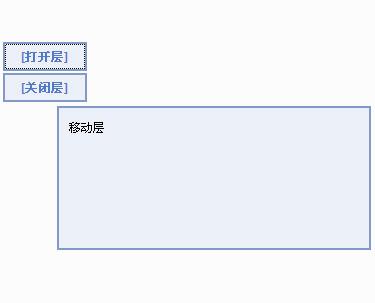
基于javascript的网页弹出层,鼠标按在弹出层的标题栏处,可以拖动该浮动层随意移动位置,不需要时也可以关闭,操作体验舒服,兼容性好,ie/火狐等众多浏览器下运行稳定、反应快速。代码表现方面,简洁务实,不玩虚的,拿去学习也相当不错。
JS代码
示例一:
<!DOCtype html>
<HTML xmlns="http://www.w3.org/1999/xhtml">
<head>
<title>弹出层并可拖拽</title>
<style>
html,body{height:100%;overflow:hidden;}
body,div,h2{margin:0;padding:0;}
body{font:12px/1.5 Tahoma;}
li{ list-style-type:none}
center{padding-top:10px;}
button{cursor:pointer;}
#overlay{position:absolute;top:0;left:0;width:100%;height:100%;background:#000;opacity:0.5;filter:alpha(opacity=50);display:none;}
#win{position:absolute;top:50%;left:50%;width:400px;height:200px;background:#fff;border:4px solid #f90;margin:-102px 0 0 -202px;display:none;}
h2{font-size:12px;height:18px;text-align:right;background:#FC0;border-bottom:3px solid #f90;padding:5px;Cursor:move;}
h2 span{color:#f90;cursor:pointer;background:#fff;border:1px solid #f90;padding:0 2px;}
</style>
<script>
window.onload = function ()
{
var oWin = document.getElementById("win");
var oLay = document.getElementById("overlay");
var oBTn = document.getElementsByTagName("button")[0];
var oClose = document.getElementById("close");
var oH2 = oWin.getElementsByTagName("h2")[0];
var bDrag = false;
var disX = disY = 0;
oBtn.onclick = function ()
{
oLay.style.display = "block";
oWin.style.display = "block"
};
oClose.onclick = function ()
{
oLay.style.display = "none";
oWin.style.display = "none"
};
oClose.onmousedown = function (event)
{
(event || window.event).cancelBubble = true;
};
oH2.onmousedown = function (event)
{
var event = event || window.event;
bDrag = true;
disX = event.clientX - oWin.offsetLeft;
disY = event.clIEntY - oWin.offsetTop;
this.setCapture && this.setCapture();
return false
};
document.onmouSEMove = function (event)
{
if (!bDrag) return;
var event = event || window.event;
var iL = event.clientX - disX;
var iT = event.clientY - disY;
var maxL = document.documentElement.clientWidth - oWin.offsetWidth;
var maxT = document.documentElement.clientHeight - oWin.offsetHeight;
iL = iL < 0 ? 0 : iL;
iL = iL > maxL ? maxL : iL;
iT = iT < 0 ? 0 : iT;
iT = iT > maxT ? maxT : iT;
oWin.style.marginTop = oWin.style.marginLeft = 0;
oWin.style.left = iL + "px";
oWin.style.top = iT + "px";
return false
};
document.onmouseup = window.onblur = oH2.onlosecapture = function ()
{
bDrag = false;
oH2.releaseCapture && oH2.releaseCapture();
};
};
</script>
<meta charset="utf-8">
</head>
<body>
<div id="overlay"></div>
<div id="win"><h2><span id="close">×</span></h2>
<li><a href='HTTP://www.100sucAI.com' target='_blank'>http://www.100sucai.com</a></li>
<li><a href="http://www.100sucai.com/WEB/JQuerytexiao/css3hehtml5" title="CSS3和HTML5">CSS3和Html5</a></li>
<li><a href="http://www.100sucai.com/web/jQuerytexiao/tubiaoyutUXing" title="图表与图形">图表与图形</a></li>
</div>
<center><button>弹出层</button></center>
</body>
</html><br />
jq代码:
代码示例二:
<!DOCTYPE html>
<html xmlns="http://www.w3.org/1999/xhtml">
<head>
<title>jquery弹出层效果</title>
<meta content="网页特效,特效代码,JQuery,css特效,js代码,广告幻灯,图片切换" name="keywords" />
<meta content="jQuery弹出层效果,有关闭按钮,代码简单易懂,你可以随意修改弹出层的参数。" name="description" />
<script src="/uploads/common/js/jquery-1.4.2.min.js" type="text/JavaScript"></script>
<style>
.black_overlay{
display: none;
position: absolute;
top: 0%;
left: 0%;
width: 100%;
height: 100%;
background-color: black;
z-index:1001;
-moz-opacity: 0.8;
opacity:.80;
filter: alpha(opacity=80);
}
.white_content {
display: none;
position: absolute;
top: 10%;
left: 10%;
width: 80%;
height: 80%;
border: 16px solid lightblue;
background-color: white;
z-index:1002;
overflow: auto;
}
.white_content_small {
display: none;
position: absolute;
top: 20%;
left: 30%;
width: 40%;
height: 50%;
border: 16px solid lightblue;
background-color: white;
z-index:1002;
overflow: auto;
}
</style>
<script type="text/Javascript">
//弹出隐藏层
function ShowDiv(show_div,bg_div){
document.getElementById(show_div).style.display='block';
document.getElementById(bg_div).style.display='block' ;
var bgdiv = document.getElementById(bg_div);
bgdiv.style.width = document.body.scrollWidth;
// bgdiv.style.height = $(document).height();
$("#"+bg_div).height($(document).height());
};
//关闭弹出层
function CloseDiv(show_div,bg_div)
{
document.getElementById(show_div).style.display='none';
document.getElementById(bg_div).style.display='none';
};
</script>
</head>
<body>
<input id="Button1" type="button" value="点击弹出层" onclick="ShowDiv('MyDiv','fade')" />
<!--弹出层时背景层DIV-->
<div id="fade" class="black_overlay">
</div>
<div id="MyDiv" class="white_content">
<div style="text-align: right; cursor: default; height: 40px;">
<span style="font-size: 16px;" onclick="CloseDiv('MyDiv','fade')">关闭</span>
</div>
目前来说,我还是喜欢这个自己改造的弹出层。自己在项目中也用的是这个。
</div>
</body>
</html>
以上通过jq和js分别实现了遮罩层点击按钮弹出并且具有拖动和关闭效果,希望对大家有所帮助。
相关推荐
- jquery新的绑定事件机制on方法的使用方法 - Web前端
- js调用iframe实现打印页面内容的方法 - Web前端
- Jquery的Tabs内容轮换效果实现代码,几行搞定 - Web前端
- Jquery利用mouseenter和mouseleave实现鼠标经过弹出层且可以点击 - Web前端
- jquery 选取方法都有哪些 - Web前端
- Jquery getJSON方法详细分析 - Web前端
- 让jQuery与其他JavaScript库并存避免冲突的方法 - Web前端
- 详解jQuery插件开发中的extend方法 - Web前端
- Jquery判断$("#id")获取的对象是否存在的方法 - Web前端
- jquery实现商品拖动选择效果代码(自写) - Web前端
- 网页前端技术排行
-
- 1[Web前端]用javascript实现默认图片替代未显示的图片 - Web前端
- 2分析Iconfont-阿里巴巴矢量常用图标库 - Web前端
- 3jQuery实例教程:制作网页中可折叠的面板 - Web前端
- 4【第六章】Foundation之按钮和下拉功能 - Web前端
- 5基于jquery的滚动条滚动固定div(附演示下载) - Web前端
- 6jQuery编写widget的一些技巧分享 - Web前端
- 7分享精心挑选的12款优秀jQuery Ajax分页插件和教程 - Web前端
- 8jQuery实现鼠标移到元素上动态提示消息框效果 - Web前端
- 9在Mac/PC上远程调试iPhone/iPad上的网页 - Web前端
- 最近发表
-
- WordPress随机显示特色图片插件:Random Post Thumbnails
- KeePass实现Chrome浏览器自动填充密码方法一
- LNMP一键包nginx 301强制跳转到https教程
- KeePass实现Chrome浏览器自动填充密码方法二
- #建站# 免费的VPS管理软件Xshell8/Xftp8中文版下载
- 使用Xshell 8连接VPS教程_电脑登录vps的方法
- WordPress评论界面添加烟花????效果
- 不同浏览器书签同步方案:坚果云+Floccus_详细使用教程
- iOS端KeePassXC客户端APP:Strongbox Password Safe
- 给WordPress评论中的Gravatar头像图片添加ALT属性