


基于jquery扩展漂亮的下拉框可以二次修改 - Web前端
作者:98wpeu发布时间:2026-08-01分类:网页前端技术浏览:113
导读:继续发一篇关于web前端自定义控件——ComboBox(下拉框),以往我在使用下拉框控件老是为了样式丑陋而烦恼,现在分享这个控件,希望有用的同仁们可以收藏,或进行二次修改,达到你想...
继续发一篇关于web前端自定义控件——ComboBox(下拉框),以往我在使用下拉框控件老是为了样式丑陋而烦恼,现在分享这个控件,希望有用的同仁们可以收藏,或进行二次修改,达到你想要的效果。
分解自定义下拉框:
1.创建构造函数,初始化赋值控件值。
2.绑定控件呈现在前台。
3.点击下拉框控件,展示下拉列表
4.点击触发下拉框控件,收起下拉列表。
5.点击下拉项触发事件。
代码如下:
html代码:
复制代码 代码如下:
<b class="select_type"></b>
CSS样式:
复制代码 代码如下:
.dropdown span a{float:left;background:url(/img/Icon_BG.png);}
/*下拉框 http://power.76741.com*/
.dropdown span a{background-position: -213px -75px;}
.dropdown{float:left;width:105px;}
.dropdown span{border:solid 1px #ccc;width:95%;height:28px;background:url(/img/tbline_bg.png);border-radius:8px;overflow:hidden;}
.dropdown span{float:left;padding-left:10px;line-height:28px; cursor:pointer;}
.dropdown span.active{border-radius:8px 8px 0px 0px;}
.dropdown span font{width:auto;margin-right: 0px;float:left;}
.dropdown span a{float:right;width:20px;height:20px;margin:4px 0;}
.dropdown p{border:solid 1px #ccc;border-top:0px;width:103px;display:none;position:absolute;margin-top:28px;background-color:#fff;z-index:3;max-height:280px;overflow-y: auto; overflow-x: hidden;}
.dropdown p a{float:left;line-height:28px;height:28px;padding-left:10px;color:#666;font-size:14px;Cursor:default;text-align:left;width:100%;overflow:hidden;}
.dropdown p a:hover{background:url(/img/tbline_bg.png);color:#666;}
JS代码:
1、自定义类:
复制代码 代码如下:
//下拉框
var ComboBox = function () {
this.tag;
this.data_default;
this.data_list;
this.index = 0;
var _this = this;
var _index, _tag, _value;
//初始化
this.init = function () {
_tag = _this.tag;
_index = _this.index;
//设置对象
_this.setDropdown(_this.data_default, _this.data_list);
//赋值绑定事件
if (_tag.find('span font').length > 0) _value = _tag.find('span font').attr('_id');
if (_tag == undefined) { returnfalse; }
_this.showevent();
_this.selectedIndex(_index);
return true;
}
//设置下拉列表
this.setDropdown = function (default_data, list) {
var css = _tag.attr('class');
if (default_data == undefined) {
default_data = { id: 'null', name: '' };
}
var _HTML = '';
if (_tag.find('p').length > 0 && _tag.find('span').length > 0) {
$.each(list, function (i, value) {
_html += '<a _id="' + value.id + '">' + value.name + '</a>';
});
_tag.find('span font').ReplaceWith('<font _id="' + default_data.id + '">' + default_data.name + '</font>');
_tag.find('p').html(_html);
} else {
_html = '<div class="dropdown ' + css + '">';
_html += '<span><font _id="' + default_data.id + '">' + default_data.name + '</font><a></a></span>';
_html += '<p>';
if (list) {
$.each(list, function (i, value) {
_html += '<a _id="' + value.id + '">' + value.name + '</a>';
});
}
_html += '</p>';
_html += '</div>';
var parent = _tag.parent();
_tag.replaceWith(_html);
_tag = parent.find('.dropdown' + (css.length > 0 ? '.' + css.replace(' ', '.') : ''));
}
}
//下拉事件
this.showEvent = function () {
_tag.find('span').unbind('click').click(function () {
var p = $(this).parent().find('p');
if (p.css('display') == 'block') {
p.css('display', 'none');
$(this).removeClass('active');
} else if (p.html().length > 0) {
p.css('display', 'block');
$(this).addClass('active');
}
});
}
//选中事件
this.selectedIndex = function (index) {
_tag.find('p a').unbind('click').click(function () {
var parent = $(this).parent().parent();
//给下拉框赋值
if ($(this).text().length > 0) {
var font = parent.find('font');
font.text($(this).text());
font.attr("_id", $(this).attr('_id'));
_this.selectedIndexExpand(parent, $(this).index());
parent.find('span').removeClass('active');
}
parent.find('p').css('display', 'none');
});
if (_tag.find('p a').length <= _index) _index = 0;
if (_value && _value != '') {
_index = _tag.find('p a[_id="' + _value + '"]').index();
}
_tag.find('p a:eq(' + _index + ')').click();
}
//选中事件扩展
this.selectedIndexExpand = function (tag, index) { }
}
2、示例代码:
复制代码 代码如下:
//HTTP://www.naoqiu.com
var Array_state = [{ id: -1, name: '状态' }, { id: 1, name: '未成功' }, { id: 2, name: '成功' }, { id: 3, name: '失败'}];
//状态下拉控件
var select_type = new ComboBox();
select_type.tag = $('.select_type');
select_type.data_default = array_state[0];
select_type.data_list = array_state;
select_type.selectedIndexExpand = function (tag, index) {
//fun_Pager();
}
select_type.init();
3、示例图:
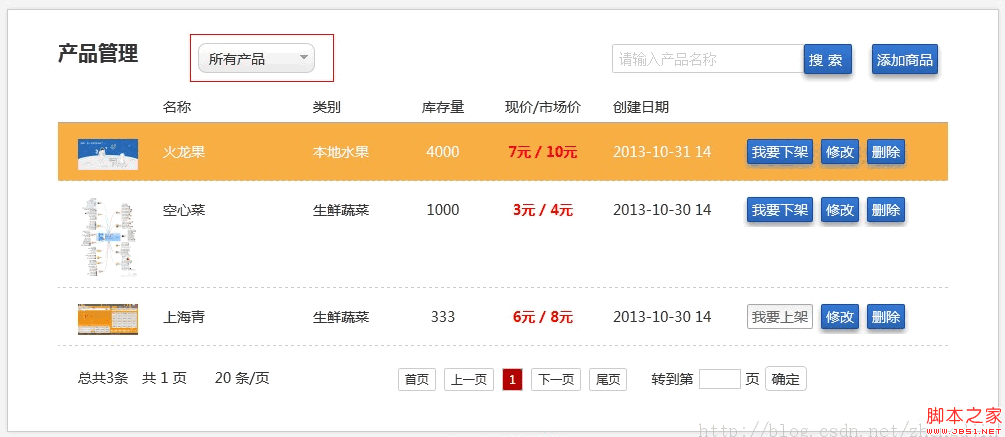
分解自定义下拉框:
1.创建构造函数,初始化赋值控件值。
2.绑定控件呈现在前台。
3.点击下拉框控件,展示下拉列表
4.点击触发下拉框控件,收起下拉列表。
5.点击下拉项触发事件。
代码如下:
html代码:
复制代码 代码如下:
<b class="select_type"></b>
CSS样式:
复制代码 代码如下:
.dropdown span a{float:left;background:url(/img/Icon_BG.png);}
/*下拉框 http://power.76741.com*/
.dropdown span a{background-position: -213px -75px;}
.dropdown{float:left;width:105px;}
.dropdown span{border:solid 1px #ccc;width:95%;height:28px;background:url(/img/tbline_bg.png);border-radius:8px;overflow:hidden;}
.dropdown span{float:left;padding-left:10px;line-height:28px; cursor:pointer;}
.dropdown span.active{border-radius:8px 8px 0px 0px;}
.dropdown span font{width:auto;margin-right: 0px;float:left;}
.dropdown span a{float:right;width:20px;height:20px;margin:4px 0;}
.dropdown p{border:solid 1px #ccc;border-top:0px;width:103px;display:none;position:absolute;margin-top:28px;background-color:#fff;z-index:3;max-height:280px;overflow-y: auto; overflow-x: hidden;}
.dropdown p a{float:left;line-height:28px;height:28px;padding-left:10px;color:#666;font-size:14px;Cursor:default;text-align:left;width:100%;overflow:hidden;}
.dropdown p a:hover{background:url(/img/tbline_bg.png);color:#666;}
JS代码:
1、自定义类:
复制代码 代码如下:
//下拉框
var ComboBox = function () {
this.tag;
this.data_default;
this.data_list;
this.index = 0;
var _this = this;
var _index, _tag, _value;
//初始化
this.init = function () {
_tag = _this.tag;
_index = _this.index;
//设置对象
_this.setDropdown(_this.data_default, _this.data_list);
//赋值绑定事件
if (_tag.find('span font').length > 0) _value = _tag.find('span font').attr('_id');
if (_tag == undefined) { returnfalse; }
_this.showevent();
_this.selectedIndex(_index);
return true;
}
//设置下拉列表
this.setDropdown = function (default_data, list) {
var css = _tag.attr('class');
if (default_data == undefined) {
default_data = { id: 'null', name: '' };
}
var _HTML = '';
if (_tag.find('p').length > 0 && _tag.find('span').length > 0) {
$.each(list, function (i, value) {
_html += '<a _id="' + value.id + '">' + value.name + '</a>';
});
_tag.find('span font').ReplaceWith('<font _id="' + default_data.id + '">' + default_data.name + '</font>');
_tag.find('p').html(_html);
} else {
_html = '<div class="dropdown ' + css + '">';
_html += '<span><font _id="' + default_data.id + '">' + default_data.name + '</font><a></a></span>';
_html += '<p>';
if (list) {
$.each(list, function (i, value) {
_html += '<a _id="' + value.id + '">' + value.name + '</a>';
});
}
_html += '</p>';
_html += '</div>';
var parent = _tag.parent();
_tag.replaceWith(_html);
_tag = parent.find('.dropdown' + (css.length > 0 ? '.' + css.replace(' ', '.') : ''));
}
}
//下拉事件
this.showEvent = function () {
_tag.find('span').unbind('click').click(function () {
var p = $(this).parent().find('p');
if (p.css('display') == 'block') {
p.css('display', 'none');
$(this).removeClass('active');
} else if (p.html().length > 0) {
p.css('display', 'block');
$(this).addClass('active');
}
});
}
//选中事件
this.selectedIndex = function (index) {
_tag.find('p a').unbind('click').click(function () {
var parent = $(this).parent().parent();
//给下拉框赋值
if ($(this).text().length > 0) {
var font = parent.find('font');
font.text($(this).text());
font.attr("_id", $(this).attr('_id'));
_this.selectedIndexExpand(parent, $(this).index());
parent.find('span').removeClass('active');
}
parent.find('p').css('display', 'none');
});
if (_tag.find('p a').length <= _index) _index = 0;
if (_value && _value != '') {
_index = _tag.find('p a[_id="' + _value + '"]').index();
}
_tag.find('p a:eq(' + _index + ')').click();
}
//选中事件扩展
this.selectedIndexExpand = function (tag, index) { }
}
2、示例代码:
复制代码 代码如下:
//HTTP://www.naoqiu.com
var Array_state = [{ id: -1, name: '状态' }, { id: 1, name: '未成功' }, { id: 2, name: '成功' }, { id: 3, name: '失败'}];
//状态下拉控件
var select_type = new ComboBox();
select_type.tag = $('.select_type');
select_type.data_default = array_state[0];
select_type.data_list = array_state;
select_type.selectedIndexExpand = function (tag, index) {
//fun_Pager();
}
select_type.init();
3、示例图:
相关推荐
- 介绍JS里一款强大的评分插件:raty - Web前端
- 你想要了解的关于vue里面axios的基本知识都在这里了 - Web前端
- 你了解过HTML之DOM nodeType属性吗? - Web前端
- Web前端开发:JavaScript中的字符串的一些应用 - Web前端
- Web前端开发:对于闭包和匿名函数的理解和应用 - Web前端
- SEO初学者对于"White Hat SEO(白帽SEO)"的认知 - Web前端
- 那些年我们曾经用过JavaScript的Null合并运算符 - Web前端
- Vue前端开发报错提示“npm ERR! missing script: dev”的解决方案 - Web前端
- ES6带来“定义变量和类(var、let、const与class)”的改革 - Web前端
- Web前端开发:探讨CSS3中元素位移、旋转、倾斜、缩放等方式 - Web前端
- 网页前端技术排行
-
- 1[Web前端]用javascript实现默认图片替代未显示的图片 - Web前端
- 2分析Iconfont-阿里巴巴矢量常用图标库 - Web前端
- 3jQuery实例教程:制作网页中可折叠的面板 - Web前端
- 4【第六章】Foundation之按钮和下拉功能 - Web前端
- 5基于jquery的滚动条滚动固定div(附演示下载) - Web前端
- 6jQuery编写widget的一些技巧分享 - Web前端
- 7分享精心挑选的12款优秀jQuery Ajax分页插件和教程 - Web前端
- 8jQuery实现鼠标移到元素上动态提示消息框效果 - Web前端
- 9在Mac/PC上远程调试iPhone/iPad上的网页 - Web前端
- 最近发表
-
- WordPress随机显示特色图片插件:Random Post Thumbnails
- KeePass实现Chrome浏览器自动填充密码方法一
- LNMP一键包nginx 301强制跳转到https教程
- KeePass实现Chrome浏览器自动填充密码方法二
- #建站# 免费的VPS管理软件Xshell8/Xftp8中文版下载
- 使用Xshell 8连接VPS教程_电脑登录vps的方法
- WordPress评论界面添加烟花????效果
- 不同浏览器书签同步方案:坚果云+Floccus_详细使用教程
- iOS端KeePassXC客户端APP:Strongbox Password Safe
- 给WordPress评论中的Gravatar头像图片添加ALT属性