


基于jquery实现漂亮的动态信息提示效果 - Web前端
作者:98wpeu发布时间:2026-07-29分类:网页前端技术浏览:146
简单,漂亮,动画效果,用户体验好! 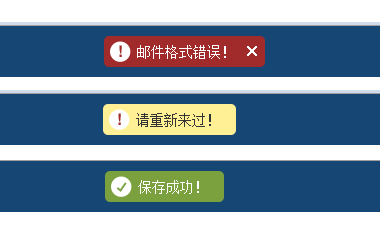
这个效果是在页面头部出现的,出现一下会自动隐藏,上面有x那个提示就要手动关闭一下,其他的都是自动隐藏的!
温馨提示:基于JQuery 1.6.2 版本!
复制代码 代码如下:
<div id="message-dock">
<div id="message-sleeve" class="group">
<p><span class="sprite message-icon"></span><span id="message-text"></span><a class="dismiss"></a></p>
</div>
</div>
调用方式:
复制代码 代码如下:
<scripttype="text/javascript" src="sysmsg.JS"></script>
<script type="text/JavaScript">
ZENG.SysMsg.show('邮件格式错误!', "error");
ZENG.SysMsg.show('请重新来过!', "alert");
ZENG.SysMsg.show('保存成功!');</script>
jQuery版:
复制代码 代码如下:
/*!
* jqueryJavascript SysMsg v1.0
* http://zengxiangzhan.cnblogs.com/
* jquery.sysmsg.js
* Copyright 2011, 曾祥展
* date: 2011-8-1 20:00 2011 -2210
*/
if (!window.ZENG) var ZENG = {};
ZENG.add = function(d, f) {
var j;
if ($.isFunction(f.init)) {
j = f.init;
delete f.init;
$.extend(true, j.prototype, f);
this[d] = j
} else this[d] = f
};
ZENG.add("SysMsg", function() {
function d(u, D, v) {
D || (D = "success");
v = v || D == "error";
if (o) {
h.push(function() {
d(u, D)
});
f()
} else {
m.html(u);
i.removeClass().addClass(D).show().Animate({
top: 0
}, 200, function() {
v || j()
});
o = 1
}
}
function f() {
i.animate({
top: "-50px"
}, 200, function() {
i.hide();
o = 0;
h.length && h.shift()()
})
}
function j() {
setTimeout(function() {
f()
}, 2E3)
}
var o, h = [],
i = $("#message-dock"),
m = i.find("#message-text");
$(".dismiss", "#message-dock").live("click", function(u) {
f();
u.PReventDefault()
});
return {
show: d
}
}());
美观样式
复制代码 代码如下:
.group {
display: block;
}
.group:after {
clear: both;
content: ".";
display: block;
height: 0;
visibility: hidden;
}
.group {
min-height: 1%;
}
* HTML .group {
height: 1%;
}
html, body, div,p{
background: none repeat scroll 0 0 transparent;
border: 0 none;
font-size: 100%;
margin: 0;
outline: 0 none;
vertical-align: baseline;
}
body {
color: #444444;
font-family: "Helvetica Neue",Helvetica,Arial,sans-serif;
font-size: 75%;
line-height: 1;
}
#message-dock {
background-color: #164673;
color: #FFFFFF;
line-height: 1.75em;
padding: 10px;
position: fixed;
top: -60px;
width: 100%;
z-index: 9999;
}
#message-dock a {
color: #FFFFFF;
font-weight: bold;
text-decoration: underline;
}
#message-dock p {
border-radius: 5px 5px 5px 5px;
float: left;
padding: 5px 6px;
}
#message-dock .dismiss {
background: url("msg.png") repeat scroll -67px -180px #A12A2A;
border-radius: 0 5px 5px 0;
display: none;
float: left;
height: 21px;
padding-left: 10px;
text-indent: -999999px;
width: 20px;
cursor: pointer;
}
.sprite {
background: url("msg.png") no-repeat scroll 0 0 transparent;
display: inline-block;
vertical-align: top;
}
#message-sleeve {
margin: 0 auto;
max-width: 1200px;
min-width: 1000px;
}
.fixed #message-sleeve {
width: 1000px;
}
#message-text {
float: left;
font-size: 1.16667em;
padding: 0 10px 0 0;
}
.success p {
background-color: #7AA13D;
}
.alert p {
background-color: #FFF095;
color: #333333;
}
.alert a {
color: #333333 !important;
}
.error p {
background-color: #A12A2A;
padding-right: 0 !important;
}
.error #message-text {
padding-right: 0;
}
.error .dismiss {
display: block !important;
}
.error .message-icon, .alert .message-icon {
background-position: 0 -249px;
}
.message-icon {
background-position: -21px -249px;
float: left;
height: 21px;
margin-right: 6px;
position: relative;
width: 21px;
}
附件: 
完毕!
相关推荐
- Javascript:实现鼠标放到图片上后的放大镜效果 - Web前端
- 聊聊vue中的路由原理以及一些简单的应用 - Web前端
- 微软的TypeScript 4.0编程语言问世:这是一个重要的里程碑 - Web前端
- 提升和优化变量和函数的应用 - Web前端
- 为什么苹果的反托拉斯之争可能意味着iOS的终结 - Web前端
- 分享前端面试中面试官提到的Node.js一些问题与解决方案 - Web前端
- 入门前端框架的必备知识点:深度比较React和Angular - Web前端
- Microsoft对开发人员:告别基于云的开发环境Visual Studio Codespaces - Web前端
- 使用Vue 3.0 Composition API构建购物清单应用 - Web前端
- 分享按钮点击CSS3特效:酷炫发散效果 - Web前端
- 网页前端技术排行
-
- 1[Web前端]用javascript实现默认图片替代未显示的图片 - Web前端
- 2分析Iconfont-阿里巴巴矢量常用图标库 - Web前端
- 3jQuery实例教程:制作网页中可折叠的面板 - Web前端
- 4【第六章】Foundation之按钮和下拉功能 - Web前端
- 5基于jquery的滚动条滚动固定div(附演示下载) - Web前端
- 6jQuery编写widget的一些技巧分享 - Web前端
- 7分享精心挑选的12款优秀jQuery Ajax分页插件和教程 - Web前端
- 8jQuery实现鼠标移到元素上动态提示消息框效果 - Web前端
- 9在Mac/PC上远程调试iPhone/iPad上的网页 - Web前端
- 最近发表
-
- WordPress随机显示特色图片插件:Random Post Thumbnails
- KeePass实现Chrome浏览器自动填充密码方法一
- LNMP一键包nginx 301强制跳转到https教程
- KeePass实现Chrome浏览器自动填充密码方法二
- #建站# 免费的VPS管理软件Xshell8/Xftp8中文版下载
- 使用Xshell 8连接VPS教程_电脑登录vps的方法
- WordPress评论界面添加烟花????效果
- 不同浏览器书签同步方案:坚果云+Floccus_详细使用教程
- iOS端KeePassXC客户端APP:Strongbox Password Safe
- 给WordPress评论中的Gravatar头像图片添加ALT属性