


读jQuery之一(对象的组成) - Web前端
作者:98wpeu发布时间:2026-07-22分类:网页前端技术浏览:184
至今电脑里还存放着当时的API文档,发个图感叹下
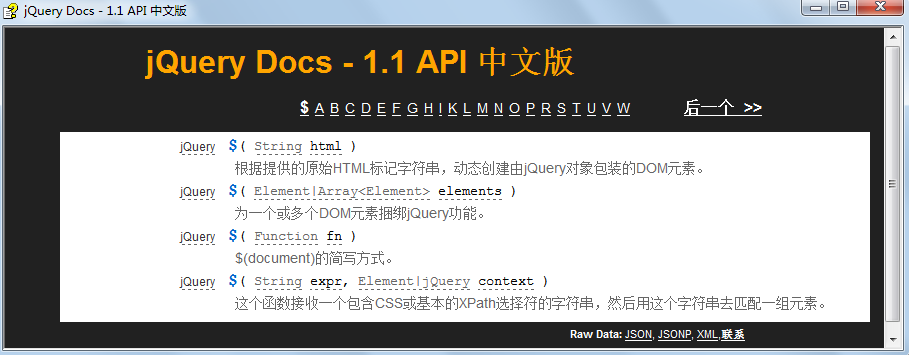
在这段时间内,我的入门老师是墨墨,其实至今他仍然是我敬仰的同事之一。他的编程造诣很高,相信早已突破了编程语言的限制。在大家都在使用PRototype.JS的时候,在jquery尚未在国内流行的时候,他就已经把JQuery引入到项目中了。
言归正传吧,目前的jQuery版本已经到了1.6.1。从当时的2000行左右膨胀到了9000行。相信不久就会突破1w行。对于一些简单网页来说引入一个jQuery已经不再那么轻量了。这里的研读的是1.6.1这个版本,我会边读边写,最后会写出一个1000行左右的“迷你jQuery”。
以下是jQuery 1.6.1 代码片段
复制代码 代码如下:
var jQuery = function( selector, context ) {
// The jQuery Object is actually just the init constructor 'enhanced'
return new jQuery.fn.init( selector, context, rootjQuery );
},
...
class2type = {};
jQuery.fn = jQuery.prototype = {
constructor: jQuery,
init: function(selector, context, rootjQuery){
}
}
// Give the init function the jQuery prototype for later instantiation
jQuery.fn.init.prototype = jQuery.fn;
初看上去像是在用 原型方式 在写一个类jQuery(别名$),但实际我们使用时是函数调用$("#id"),却不是new $("#id")。
标识符 jQuery是一个function,其内new了一个function init的实例,然后返回。至此我们知道其真正的构造器是jQuery.fn.init。jQuery写的实在诡异,它把init又挂在了jQuery的prototype上,阅读起来有些绕人。
jQuery.fn.init.prototype = jQuery.fn; 是关键的一句。该句把function jQuery的原型赋值给了function init的原型。当调用$("#id")时返回的对象组成包括两个部分。
1,由function init中this带的(如this.context);
2,由function jQuery的prototype带的(如this.size/this.toArray);
模仿jQuery写一个
复制代码 代码如下:
// zchAIn-0.1.js
function $(selector){
return new $.prototype.init(selector);
}
$.prototype={
init:function(selector){
if(selector === undefined){
this.length = 0;
return this;
}
if(selector.nodeType==1){
this[0] = selector;
}else{
this[0]=document.getElementById(selector);
}
this.length=1;
},
CSS:function(name,value){
this[0].style[name] = value;
return this;//链式调用
},
hide:function(){
var self=this;
setTimeout(function(){
self[0].style.display="none";
},3000);
return this;//链式调用
}
}
$.prototype.init.prototype=$.prototype;
简单起见,这里选择器只传html element或元素id(后续会增强,但不实现全部css selector),this上挂了length属性,赋值为1。
当我们调用时
复制代码 代码如下:
var obj = $();
console.dir(obj);
$()实际没有什么意义,只是为了测试调用后obj的组成。firebug控制台输出如下:
length:0;
init:function
attr:function
hide:function
即obj对象是由function init中this及function $.prototype组成的。
再看下$.prototype上的方法,我只添加了css和hide方法,这两个方法的实现也是极其简陋的。
复制代码 代码如下:
<script src="http://files.cnblogs.com/snandy/zchain-0.1.js"></script>
<div id='content'>3 seconds later I will hide.</div>
<script type="text/javascript">
$("content").css("color","red").hide();
</script>
先调用css设置了字体颜色为红色,3秒后隐藏了。
总结下:
jQuery对象指的是jQuery.prototype.init的实例,简单的说就是new jQuery.prototype.init。这里jQuery.prototype.init的类型是function,可以看成是一个类。
jQuery对象由以下部分组成:
1,挂在jQuery.prototype.init中的this上的属性或方法。
2,挂在jQuery.prototype.init.prototype上的属性或方法。
3,因为把jQuery.prototype赋值给了jQuery.prototype.init.prototype,所以挂在jQuery.prototype上的属性和方法也是jQuery对象的一部分。
4,通过jQuery.fn.extend({...})方式扩展的属性或方法(后续提到)。
/201106/yuanma/zchain.rar
相关推荐
- 有用的内容更新后,关键字优化如何变化? - Web前端
- 页面内存泄漏怎么检测?手把手教你定位和解决 - Web前端
- 想学Vue3自定义指令却不知道从哪入手? - Web前端
- React Router DOM如何传递和获取路由参数? - Web前端
- React Router DOM如何结合History对象管理导航? - Web前端
- JavaScript原型链是怎么工作的? - Web前端
- 前端开发:语法结构,写代码的「简洁度」差异 - Web前端
- JavaScript里var、let、const声明变量有啥区别? - Web前端
- 先搞懂同步与异步,Node.js 文件操作的两种逻辑 - Web前端
- 想在Node.js里给接口发请求、抓网页数据,却不知道从哪下手? - Web前端
- 网页前端技术排行
-
- 1[Web前端]用javascript实现默认图片替代未显示的图片 - Web前端
- 2分析Iconfont-阿里巴巴矢量常用图标库 - Web前端
- 3jQuery实例教程:制作网页中可折叠的面板 - Web前端
- 4【第六章】Foundation之按钮和下拉功能 - Web前端
- 5基于jquery的滚动条滚动固定div(附演示下载) - Web前端
- 6分享精心挑选的12款优秀jQuery Ajax分页插件和教程 - Web前端
- 7jQuery实现鼠标移到元素上动态提示消息框效果 - Web前端
- 8jQuery编写widget的一些技巧分享 - Web前端
- 9在Mac/PC上远程调试iPhone/iPad上的网页 - Web前端
- 最近发表
-
- WordPress随机显示特色图片插件:Random Post Thumbnails
- KeePass实现Chrome浏览器自动填充密码方法一
- LNMP一键包nginx 301强制跳转到https教程
- KeePass实现Chrome浏览器自动填充密码方法二
- #建站# 免费的VPS管理软件Xshell8/Xftp8中文版下载
- 使用Xshell 8连接VPS教程_电脑登录vps的方法
- WordPress评论界面添加烟花????效果
- 不同浏览器书签同步方案:坚果云+Floccus_详细使用教程
- iOS端KeePassXC客户端APP:Strongbox Password Safe
- 给WordPress评论中的Gravatar头像图片添加ALT属性