


jquery和雅虎的yql服务实现天气预报服务示例 - Web前端
作者:98wpeu发布时间:2026-05-22分类:网页前端技术浏览:157
本代码不涉及任何后端开发代码(如.Net,java等)。目前最权威的天气预报数据是中国天气网(http://www.weather.com.cn/),因为这个是官方提供的气象数据,除了商业的增值服务外,还提供了免费的以json数据格式返回的气象数据,以查看杭州的天气数据为例,可以输入以下地址:http://m.weather.com.cn/data/101210101.html ,返回的JSON数据格式如下图:
YQL服务可以实现对网上不同数据源的query,filter,combine(查询,过滤,合并),提供类似sql,具体地址如下:HTTP://developer.Yahoo.com/yql/console/ 。当实施查询的时候,YQL服务就会访问网络上的数据源,传输数据,返回xml或者JSON形式的数据结果。YQL可以使用许多类型的数据源,包括Yahoo!WEBservices 或者其他的网络服务,和网络数据类型例如:HTML, XML, RSS,和Atom。
因此可以通过两者的结合使用,完成天气预报功能的开发,具体js代码如下: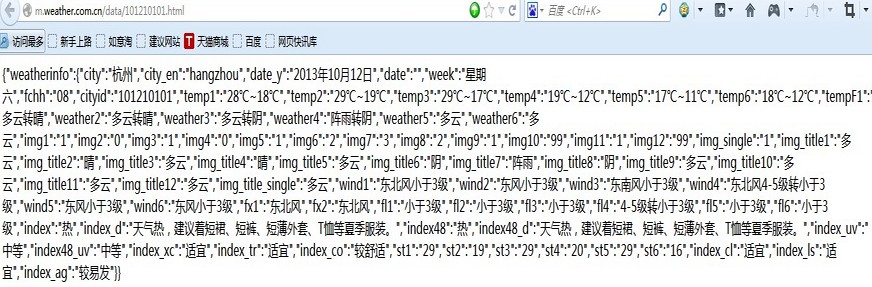
复制代码 代码如下:
functiongetWeather() {
$.getJSON("http://query.yahooAPIs.com/v1/public/yql", {
q: "select * from json where url=\"http://m.weather.com.cn/data/101210101.html\"",
FORMat: "json"
}, function (data) {
if (data.query.results) {
//$("#content").text(JSON.stringify(data.query.results));
var J_data = JSON.parse(JSON.stringify(data.query.results));
//alert(J_data.weatherinfo.city);
$("#content").append("<p>"+J_data.weatherinfo.city+"天气预报(数据来源中国天气网)"+"</p>");
$("#content").APPend("<p>"+J_data.weatherinfo.date_y+" "+J_data.weatherinfo.week+" "+J_data.weatherinfo.temp1+" "+J_data.weatherinfo.weather1+" "+J_data.weatherinfo.wind1+" "+J_data.weatherinfo.index+" "+J_data.weatherinfo.index_d+"</p>");
var t= J_data.weatherinfo.Date_y;
t=t.Replace("年","/");
t=t.replace("月","/");
t=t.replace("日","");
var tdy = new date(t);
var t2 = new Date();
t2.setDate(tdy.getDate()+1);
$("#content").append("<p>"+ t2.format("yyyy年MM月dd日")+" "+getweekdays(t2)+" "+J_data.weatherinfo.temp2+" "+J_data.weatherinfo.weather2+" "+J_data.weatherinfo.wind2+"</p>");
var t3 = new Date();
t3.setDate(tdy.getDate()+2);
$("#content").Append("<p>"+t3.Format("yyyy年MM月dd日")+" "+getweekdays(t3)+" "+J_data.weatherinfo.temp3+" "+J_data.weatherinfo.weather3+" "+J_data.weatherinfo.wind3+"</p>");
var t4 = new Date();
t4.setDate(tdy.getDate()+3);
$("#content").append("<p>"+t4.Format("yyyy年MM月dd日")+" "+getweekdays(t4)+" "+J_data.weatherinfo.temp4+" "+J_data.weatherinfo.weather4+" "+J_data.weatherinfo.wind4+"</p>");
var t5 = new Date();
t5.setDate(tdy.getDate()+4);
$("#content").append("<p>"+t5.Format("yyyy年MM月dd日")+" "+getweekdays(t5)+" "+J_data.weatherinfo.temp5+" "+J_data.weatherinfo.weather5+" "+J_data.weatherinfo.wind5+"</p>");
var t6 = new Date();
t6.setDate(tdy.getDate()+5);
$("#content").append("<p>"+t6.Format("yyyy年MM月dd日")+" "+getweekdays(t6)+" "+J_data.weatherinfo.temp6+" "+J_data.weatherinfo.weather6+" "+J_data.weatherinfo.wind6+"</p>");
//alert(getweekdays(t2));
} else {
$("#content").text('no such code: ' + code);
}
});
//$.getJSON("http://m.weather.com.cn/data/101210101.html", null, function(json) { alert(json); });
}
function getweekdays(datey)
{
if(datey.getDay()==0)
{
return "星期日";
}
else if(datey.getDay()==1)
{
return "星期一";
}
else if(datey.getDay()==2)
{
return "星期二";
}
else if(datey.getDay()==3)
{
return "星期三";
}
else if(datey.getDay()==4)
{
return "星期四";
}
else if(datey.getDay()==5)
{
return "星期五";
}
else if(datey.getDay()==6)
{
return "星期六";
}
}
最终实现的效果,如下图: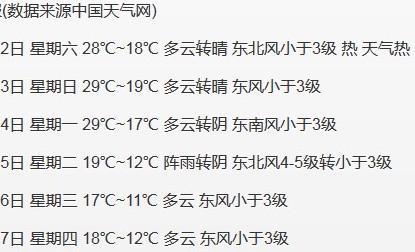
相关推荐
- Jquery ajax基础教程 - Web前端
- 程序员必知35个jQuery 代码片段 - Web前端
- jQuery表格行上移下移和置顶的实现方法 - Web前端
- 基于jquery实现复选框全选,反选,全不选等功能 - Web前端
- Jquery全屏相册插件zoomvisualizer具有调节放大与缩小功能 - Web前端
- jQuery实现隔行变色的方法分析(对比原生JS) - Web前端
- jQuery实现的简单拖拽功能示例 - Web前端
- jquery心形点赞关注效果的简单实现 - Web前端
- 基于jQuery和Bootstrap框架实现仿知乎前端动态列表效果 - Web前端
- Jquery on绑定的事件 触发多次实例代码 - Web前端
- 网页前端技术排行
-
- 1[Web前端]用javascript实现默认图片替代未显示的图片 - Web前端
- 2分析Iconfont-阿里巴巴矢量常用图标库 - Web前端
- 3jQuery实例教程:制作网页中可折叠的面板 - Web前端
- 4基于jquery的滚动条滚动固定div(附演示下载) - Web前端
- 5【第六章】Foundation之按钮和下拉功能 - Web前端
- 6jQuery编写widget的一些技巧分享 - Web前端
- 7分享精心挑选的12款优秀jQuery Ajax分页插件和教程 - Web前端
- 8jQuery实现鼠标移到元素上动态提示消息框效果 - Web前端
- 9在Mac/PC上远程调试iPhone/iPad上的网页 - Web前端
- 最近发表
-
- WordPress随机显示特色图片插件:Random Post Thumbnails
- KeePass实现Chrome浏览器自动填充密码方法一
- LNMP一键包nginx 301强制跳转到https教程
- KeePass实现Chrome浏览器自动填充密码方法二
- #建站# 免费的VPS管理软件Xshell8/Xftp8中文版下载
- 使用Xshell 8连接VPS教程_电脑登录vps的方法
- WordPress评论界面添加烟花????效果
- 不同浏览器书签同步方案:坚果云+Floccus_详细使用教程
- iOS端KeePassXC客户端APP:Strongbox Password Safe
- 给WordPress评论中的Gravatar头像图片添加ALT属性